Freelancing gives you control over your schedule, but that same freedom is exactly why time slips away so easily. Without a manager checking in or a fixed 9-to-5 structure, it’s up to you to decide what gets done today, what waits until tomorrow, and how many client logins you can juggle before something falls through the cracks. The right time management tools for freelancers turn that chaos into a repeatable system — one that protects your billable hours, your deadlines, and your sanity, whether you found your clients through referrals or one of the best freelance websites in 2026.
This guide updates our original list with a deeper, more practical breakdown of the tools that actually move the needle in 2026: task boards, time trackers, focus timers, scheduling apps, and — because most freelancers now juggle several client accounts across social media, ad platforms, and CMS logins — the account-management layer that quietly eats hours every single week if you don’t solve it.
How Time Management Benefits Freelancers
Effective time management isn’t about cramming more tasks into your day — it’s about assigning the right amount of attention to the right work at the right time. For freelancers specifically, that discipline compounds into real business outcomes.
- Higher productivity and efficiency — structured time blocks reduce the friction of deciding what to do next, so more of your energy goes into actual output.
- A genuine sense of accomplishment — visible progress on a task list or tracker builds momentum instead of the vague anxiety of “I should be doing something.”
- Stronger self-discipline — sticking to a schedule you set yourself is harder than following someone else’s, and tools that create accountability make it easier.
- Better decision-making — when you’re not constantly firefighting, you have the mental bandwidth to price jobs correctly, say no to scope creep, and plan your pipeline.
- Improved work-life balance — freelancers without boundaries tend to work more hours, not fewer. Time-boxing protects your evenings and weekends.
- Less procrastination and distraction — tools built around focus sessions (like Pomodoro timers) make starting a task less intimidating.
- Higher-quality work — rushed, disorganized work is where mistakes creep in. A calm schedule leaves room to actually check your output before sending it.
The following section breaks down the specific tools worth adopting in 2026, what each one is genuinely good at, and where it falls short.
What to Look For in a Freelance Time Management Tool
Not every productivity app is built for freelance work. Before adopting anything new, it helps to check it against a few practical criteria:
- Low setup overhead — if a tool takes a weekend to configure, you’ll abandon it by week two. Freelancers need something they can start using the same day.
- Client-friendly — can you share a board, invoice, or time log with a client without forcing them to create an account or learn new software?
- Cross-device syncing — you’ll switch between a laptop, a phone, and sometimes a client’s machine. Your system needs to follow you.
- Room to scale — a tool that works for one client should still work when you have ten, without turning into a spreadsheet nightmare.
- Doesn’t create new security or account risk — this one is easy to overlook. Many freelancers manage logins for multiple clients’ social media, ad accounts, and CMS dashboards, and using the same browser session for all of them can trigger security flags or, worse, mix up client data.
If you’re already feeling the strain of context-switching between five different client accounts before lunch, you’re not alone — it’s one of the most common reasons freelancers burn out, and it’s exactly what we cover in the secret tool freelancers use to juggle clients without burning out.
7 Time Management Tools for Freelancers in 2026
Freelancers often struggle with time management not because they lack discipline, but because they’re stitching together too many disconnected tools. Here are seven that, combined thoughtfully, cover almost every angle of a freelance workflow.
1. Trello — Visual Task and Project Management
Trello remains one of the easiest ways to map out your workflow without getting overwhelmed by long-term projects or daily tasks. Its card-and-column (kanban) layout lets you organize work into stages — say, “To Do,” “In Progress,” “Client Review,” and “Done” — and assign due dates, checklists, and comments to each card.
Benefits of using Trello:
- Streamlines your workflow so you can prioritize tasks visually instead of from memory.
- Tracks progress on individual tasks and long-term projects in one place.
- Lets you leave comments for yourself or loop in collaborators on a specific task.
- Declutters your mind by externalizing your to-do list instead of carrying it around mentally.
2. Notion — The All-in-One Freelance Workspace
Notion has become a default choice for freelancers who want project boards, client wikis, invoices, and notes in a single workspace instead of five separate apps. Its flexibility is both its strength and its risk — it’s powerful enough to build an entire business operating system in, but only if you resist the urge to over-engineer your setup before you’ve even started using it.
Benefits of using Notion:
- Combines task boards, documents, and databases so you’re not toggling between apps all day.
- Client-facing pages can be shared as a clean, branded portal without exposing your whole workspace.
- Templates for freelance CRMs, content calendars, and invoice trackers cut setup time dramatically.
3. Time-Tracking Tools (Toggl Track, Clockify) — Know Where Your Hours Go
If you bill hourly — or even if you bill by project but want to understand your real effective rate — a dedicated time tracker is non-negotiable. Tools in this category let independent contractors log billable hours against specific clients and projects, generate shareable reports, and spot where time is quietly leaking out of the day.
Benefits of using a time tracker:
- Quickly and accurately logs billable hours by client and project instead of relying on end-of-week guesswork.
- Eliminates missed billing opportunities — every tracked minute becomes an invoice line item.
- Surfaces reports that show which clients or task types are eating disproportionate amounts of time.
- Many tools in this category support real-time notifications so subcontractors or VAs can log time from anywhere.
4. TeuxDeux — Minimalist Daily To-Do Lists
TeuxDeux is a deliberately simple web app for creating lists, managing tasks, and planning activities up to three weeks in advance. It resists the temptation to add project management bloat — for freelancers who find Trello or Notion too heavy for daily task planning, TeuxDeux is the lighter alternative.
Benefits of using TeuxDeux:
- Keeps you focused on what must be completed today while still visualizing the week ahead.
- Builds accountability by letting you cross off finished items and see your own follow-through.
- Unfinished items drag easily to the next day, so nothing silently disappears from your list.
- Plans one-off events up to three weeks out so commitments aren’t forgotten in the daily shuffle.
5. Pomodoro Timers (Pomodoro Tracker, Focus Booster) — Focus in Sprints
Freelancers favor the Pomodoro technique because it reduces distraction without demanding superhuman willpower — you only have to commit to 25 focused minutes at a time. Pomodoro apps track your sprints, log your break intervals, and adjust the structure to match how you actually work.
Benefits of using a Pomodoro tracker:
- Optimizes productivity by breaking work into sprints that are easier to start than an open-ended task.
- Tracks your progress across the day so you can adjust the sprint length to fit your energy levels.
- Keeps you anchored to priority tasks instead of drifting into busywork.
- Signals exactly when to take breaks, which protects focus for the next sprint instead of burning out mid-afternoon.
6. Calendly — Automated Scheduling Without the Email Back-and-Forth
Every unscheduled email thread (“does Tuesday at 2pm work? how about Wednesday?”) is time management debt. Calendly-style scheduling tools let clients book directly into your real availability, sync with your existing calendar, and automatically handle time zone conversion — a genuine time-saver for freelancers working with international clients.
Benefits of using automated scheduling:
- Removes the back-and-forth of finding a meeting time, often saving several emails per booking.
- Buffers between meetings so you’re never scheduled back-to-back without breathing room.
- Reduces no-shows with automated reminders sent ahead of the meeting.
7. Send.win — Get Back the Hours Lost Switching Between Client Accounts
This is the tool most “time management” lists skip, and it’s a real gap. Once you’re managing more than one or two clients, you’re not just managing tasks — you’re managing logins. Client social media accounts, ad manager dashboards, CMS backends, multiple email accounts, and shared tools all require separate sessions, and constantly logging out of one account to log into another (often re-entering two-factor codes each time) adds up to real, wasted hours every week.
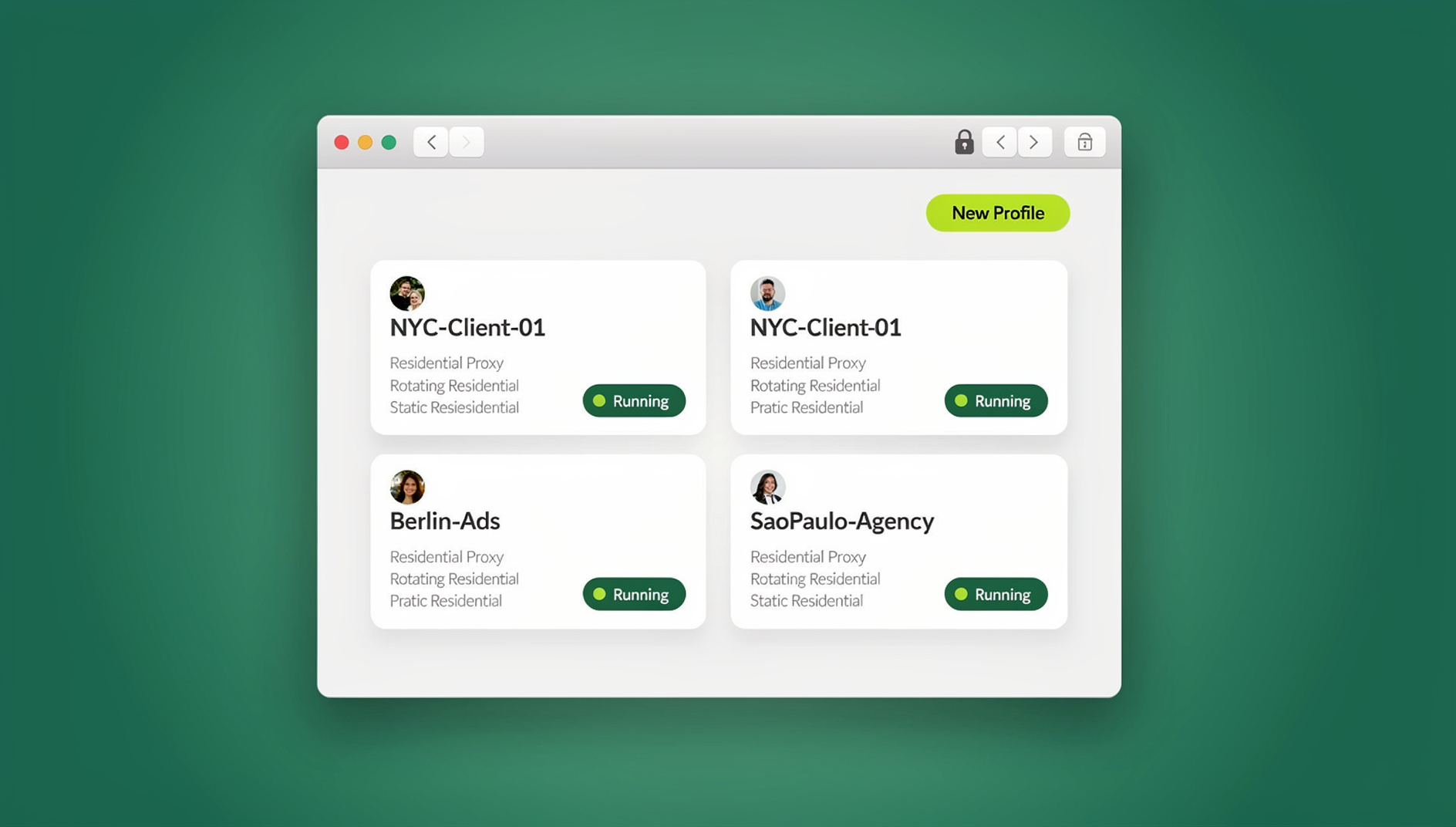
Send.win is a browser profile manager built to solve exactly this. Instead of one browser juggling every client’s cookies and sessions, you create an isolated profile per client — each with its own consistent browser fingerprint, its own cookies, and, if needed, its own proxy so the session matches the client’s expected location. You switch between profiles with a single click instead of logging out and back in, and because each profile is isolated, client accounts stay organised and separate instead of sharing one browser identity.
For freelancers specifically, three parts of Send.win matter beyond basic profile switching:
- The native Desktop app (Windows, macOS, and Linux) runs your client profiles locally, so switching accounts is instant and doesn’t depend on a browser tab staying open — useful when you’re bouncing between five client dashboards in the same morning.
- Team sharing lets you hand a subcontractor or virtual assistant access to a specific client’s profile without ever handing over the actual password — useful the moment you start delegating work instead of doing everything solo.
None of this replaces a task board or a time tracker — but if you’ve ever lost fifteen minutes re-authenticating into a client’s ad account before you could even start the task you were tracking, you already know why this belongs on the list. It’s less a “to-do” tool and more a way to remove the friction between deciding to work and actually being logged in to do it.
Time Management Tool Comparison
| Tool | Primary Use | Free Option | Best For |
|---|---|---|---|
| Trello | Visual task/project boards | Yes | Freelancers who think in workflows and stages |
| Notion | All-in-one workspace | Yes | Freelancers who want tasks, docs, and CRM in one place |
| Toggl Track / Clockify | Time tracking & billing | Yes | Hourly billers who need accurate invoices |
| TeuxDeux | Daily to-do lists | Trial | Freelancers who find kanban boards too heavy |
| Pomodoro Tracker | Focus sprints | Yes | Freelancers who struggle with distraction |
| Calendly | Scheduling automation | Yes | Freelancers juggling client meetings across time zones |
| Send.win | Multi-account browser & login management | No free trial; 7-day money-back guarantee on first card purchase; free cloud demo | Freelancers managing multiple client logins/accounts |
Step-by-Step: Building a Time Management System That Actually Sticks
Adopting tools one at a time without a system rarely works. Here’s a practical sequence for putting it together:
- Audit your current week. For three to five days, jot down what you actually spend time on — including admin, logins, and context-switching, not just “work.”
- Pick one task tool, not three. Choose Trello or Notion (not both) as your single source of truth for what needs to get done.
- Turn on time tracking for every client project. Even flat-fee projects benefit from knowing your real effective hourly rate.
- Block focus sprints on your calendar. Use a Pomodoro tool to protect at least two uninterrupted blocks per day for deep work.
- Automate scheduling. Replace manual meeting emails with a booking link so client calls stop eating into your planning time.
- Separate your client logins. Set up a dedicated Send.win profile per client so switching accounts takes one click instead of a login-and-2FA cycle.
- Review weekly, not daily. Once a week, look at your tracked hours and task completion rate, and adjust — daily micromanaging of your own system defeats the purpose.
Common Time Management Mistakes Freelancers Make
Treating every client account the same way
Using one browser session for every client’s social media, ad account, and CMS login feels convenient until an account gets flagged for suspicious activity, or you accidentally post to the wrong client’s page. Isolating client sessions — whether through separate browser profiles or a dedicated multi-login tool — prevents both problems.
Tool-hopping instead of tool-mastering
Switching productivity apps every few months resets your habits back to zero. Pick tools that cover the criteria above and commit to them for at least a quarter before reevaluating.
Tracking tasks but not time
A task list tells you what’s done. It doesn’t tell you that a “quick edit” actually took ninety minutes. Without time tracking, freelancers routinely underprice their own work.
No buffer between meetings or tasks
Back-to-back calls and tasks leave no room for the inevitable overrun. Building 10–15 minute buffers into your schedule prevents one delay from cascading through your whole day.
🏆 Send.win Verdict
Task boards, time trackers, and Pomodoro apps solve how you plan and track your work — but freelancers juggling several client accounts lose real hours to a problem those tools don’t touch: constantly logging in and out of separate client logins. Send.win closes that gap with isolated profiles per client, each with its own consistent browser fingerprint, instant one-click switching via its native Desktop app, and secure team sharing for subcontractors. It’s the missing piece in most freelance time management stacks.
Try the free Send.win cloud demo — a 3-minute preview without signup, or 10 minutes a day with a free account — and stop losing billable hours to login screens.
Frequently Asked Questions
What is the best time management tool for freelancers in 2026?
There isn’t a single “best” tool — most freelancers need a small stack: a task board (Trello or Notion), a time tracker (Toggl Track or Clockify), a focus tool (a Pomodoro app), and, if you manage multiple client accounts, a multi-login browser like Send.win to eliminate constant re-authentication.
Do freelancers really need a time tracker if they charge flat rates?
Yes. Even on flat-fee projects, tracking your hours reveals your real effective hourly rate, which is essential information when you’re pricing your next proposal or deciding whether to keep a client.
How does the Pomodoro technique help with freelance work specifically?
Freelancers rarely have a manager enforcing focus, so distraction is the default. Committing to a single 25-minute sprint is far easier to start than an open-ended “work on the project” block, which is why Pomodoro-based tools have such high adoption among independent workers.
What’s the risk of using one browser for all my client accounts?
Platforms track browser fingerprints and IP behavior. Logging into multiple unrelated client accounts from the same browser session can trigger security reviews or account flags, and increases the chance of accidentally taking an action on the wrong client’s account.
How does Send.win help with time management specifically?
It removes the login/logout cycle entirely. Each client gets its own isolated profile with a unique fingerprint, so switching between accounts is one click instead of a full re-authentication — including 2FA — every time you move between clients.
Is there a Send.win desktop app, or is it browser-only?
Send.win has a native Desktop app for Windows, macOS, and Linux, so profiles run locally rather than depending on keeping a browser tab open, which makes switching between client accounts faster during a busy work session.
Can I automate repetitive client tasks with Send.win?
No — Send.win has no automation interface: no API, SDK, headless mode or Selenium/Puppeteer/Playwright support on any plan. What it does offer is isolated profiles, each with its own consistent browser fingerprint, cookies and storage, so repetitive client work stays organised across separate profiles.
How much does Send.win cost?
Send.win has no free trial. Paid plans start at $19/month for the Pro tier ($83.88/year), while the Team plan is $49/month ($251.88/year) and includes team-sharing features. The first card purchase is covered by a 7-day money-back guarantee, and the only free option is the cloud demo.
What’s the single fastest change a freelancer can make to improve time management?
Start tracking time for one week without changing anything else. Most freelancers are surprised by where their hours actually go — often into logins, context-switching, and unbilled admin — before they even look at their task list.