Why Instagram Keeps Blocking Your Multiple Accounts
If you manage several Instagram profiles from the same device, you’ve almost certainly seen the dreaded “Action Blocked” popup. Instagram action blocked multiple accounts is one of the most common issues social-media managers face — and it happens because Instagram’s anti-spam systems detect patterns that link your accounts together. The good news: once you understand the triggers, you can eliminate blocks permanently by isolating each account in its own browser environment with a unique fingerprint and IP address.
What Does “Action Blocked” Actually Mean?
When Instagram displays the “Action Blocked” message, it means the platform has temporarily restricted one or more actions on your account. It’s Instagram’s way of telling you that your behaviour looks automated, spammy, or otherwise suspicious.
Common Symptoms You’ll See
- “Action Blocked” popup: A modal that appears when you try to like, comment, follow, or send a DM. It may include a checkbox asking you to confirm you’re not a robot.
- Temporary follow/like/comment limits: Instagram silently caps the number of actions you can perform per hour or per day. You’ll notice buttons greying out or actions simply not registering.
- Temporary ban (24-48 hours): A harder restriction where all interactive features are locked. You can browse, but you can’t engage.
- Permanent action block: In severe cases, the block persists for weeks and may escalate to a full account suspension.
- Content removal warnings: Instagram may retroactively remove likes, comments, or follows it considers spammy.
- “We restrict certain activity” message: A softer version of the block that warns you to slow down before a full restriction kicks in.
How Long Do Action Blocks Last?
| Block Severity | Typical Duration | Trigger Pattern |
|---|---|---|
| Soft warning | 1–2 hours | Slightly exceeding hourly action limits |
| Temporary block | 24–48 hours | Repeated limit violations, sudden activity spike |
| Extended block | 3–7 days | Multiple temporary blocks in a short period |
| Hard block | 14–30 days | Automation detection, linked account penalties |
| Permanent restriction | Indefinite | Repeated violations, Terms of Service breach |
Why Instagram Blocks Actions on Multiple Accounts
Instagram uses a layered detection system that goes far beyond just tracking how many likes you’ve clicked. When you run multiple accounts, the platform cross-references dozens of signals to determine whether accounts are operated by the same person — and whether that person is behaving like a spammer.
1. IP Address Sharing
This is the single biggest trigger. When multiple Instagram accounts operate from the same IP address, Instagram flags the relationship immediately. Even if the accounts are in different niches, sharing an IP creates a link in Instagram’s internal graph. If one account gets restricted, the penalty can cascade to every other account on that IP.
This is especially problematic on residential connections where your IP rarely changes, and on shared Wi-Fi networks like co-working spaces or university campuses.
2. Device Fingerprint Linking
Instagram collects browser and device fingerprints — screen resolution, installed fonts, WebGL renderer, timezone, language settings, canvas hash, and more. When you simply switch between accounts in the same browser, all those accounts share an identical fingerprint. Instagram treats them as a single entity.
Even “private” or “incognito” mode doesn’t help here. Incognito tabs clear cookies but keep the same underlying fingerprint. Instagram’s detection systems are sophisticated enough to see through this.
3. Rapid and Repetitive Actions
Instagram enforces strict hourly and daily action limits. The exact numbers aren’t published, but community testing suggests roughly:
- Follows: 20–30 per hour, 100–200 per day
- Likes: 50–80 per hour, 300–500 per day
- Comments: 15–25 per hour, 100–150 per day
- DMs: 30–50 per day for new accounts, more for established ones
When you’re managing five or ten accounts, it’s easy to blow past these limits without realising it — especially if you’re doing the same growth actions on each profile in quick succession.
4. New Account + Aggressive Behaviour
Fresh Instagram accounts have virtually no trust score. Instagram watches new accounts closely for the first 2–4 weeks. If a brand-new account immediately starts following hundreds of people, liking aggressively, or posting comments with links, it triggers red flags instantly.
The problem compounds when you create several new accounts at once and run them all the same way. Instagram interprets this as a spam farm.
5. API and Automation Detection
If you’re using third-party tools, bots, or scripts to automate actions, Instagram’s systems are increasingly effective at detecting non-human interaction patterns. Perfectly timed intervals between actions, identical comment text across accounts, and API calls that don’t match the official Instagram app’s behaviour all raise flags.
Even tools that claim to be “undetectable” often leave traces in the network request headers, timing patterns, or interaction sequences that Instagram’s machine learning models can identify.
6. Cookie and Session Leakage
When you log into multiple accounts in the same browser — even in different tabs — session cookies, localStorage data, and IndexedDB entries can leak between accounts. Instagram’s tracking scripts can detect when the same browser environment has been used to authenticate multiple accounts, creating a permanent link between them.
How to Fix Instagram Action Blocks (By Effort Level)
Here are the most effective fixes, ordered from easiest to most thorough.
Level 1: Wait It Out
The simplest fix. Stop all activity on the blocked account for 24–48 hours. Don’t log in, don’t scroll, don’t even open the app. For most soft blocks, this is enough. Instagram’s systems will lift the restriction automatically once the cooldown period passes.
Pro tip: While waiting, don’t switch to another account on the same device. If Instagram has linked your accounts, activity on one can extend the block on another.
Level 2: Switch Your IP Address
If the block persists after waiting, your IP address may be flagged. Switch to a different network — use mobile data instead of Wi-Fi, or connect through a reputable proxy or VPN. Residential proxies are ideal because they look like real user connections to Instagram’s systems.
Avoid free proxies and datacenter IPs. Instagram maintains databases of known proxy and VPN IP ranges, and using them can make things worse.
Level 3: Clear Cookies and Cache
Clear all browser data associated with Instagram — cookies, cache, localStorage, and IndexedDB. This removes tracking tokens that Instagram may have planted to monitor your activity. After clearing, log back in fresh.
On mobile, uninstall and reinstall the Instagram app to get a clean slate. On desktop, clearing cookies alone may not be sufficient if the browser fingerprint is already flagged.
Level 4: Use Isolated Browser Profiles (The Permanent Fix)
This is the real solution for anyone managing multiple Instagram accounts. Instead of running all accounts in the same browser with the same fingerprint and IP, create a separate browser profile for each account. Each profile should have:
- Its own unique browser fingerprint (user agent, screen resolution, WebGL, canvas, fonts)
- A dedicated proxy or IP address
- Isolated cookies and session storage
- Its own timezone and language settings matching the proxy location
This is exactly what session isolation is designed to achieve. Each Instagram account lives in a completely separate browser environment that Instagram cannot link to your other accounts.
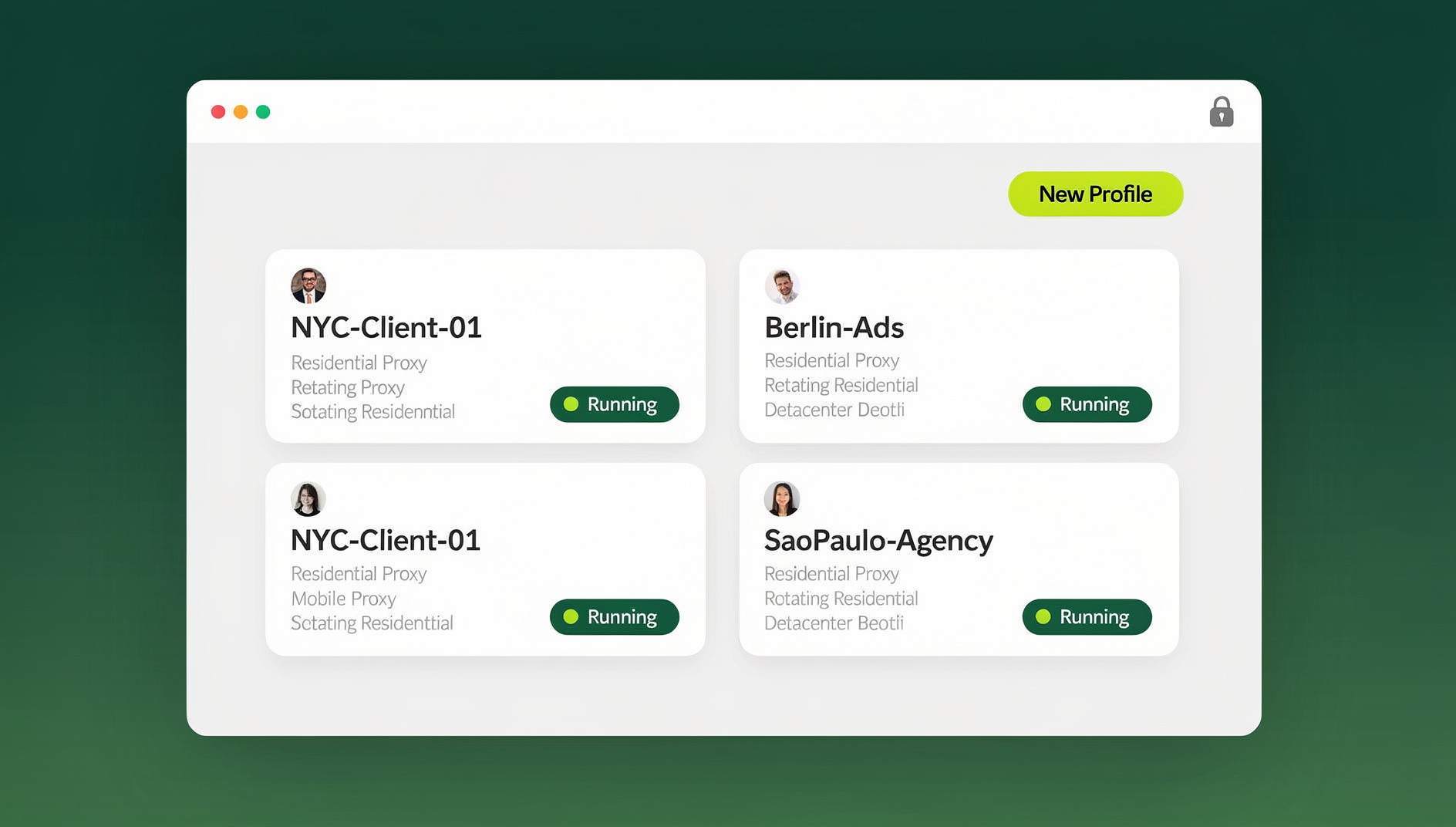
Send.win makes this effortless. You create one browser profile per Instagram account. Each profile automatically generates a unique fingerprint, stores its own cookies, and routes traffic through a dedicated proxy. From Instagram’s perspective, each account is being accessed from a completely different device in a completely different location.
Preventing Action Blocks: A Proactive Strategy
Fixing blocks is important, but preventing them in the first place is far more effective. Here’s a comprehensive prevention framework.
Warm-Up Schedule for New Accounts
Never go full throttle on a new Instagram account. Use a gradual warm-up over the first 30 days:
| Week | Daily Follows | Daily Likes | Daily Comments | Posts per Week |
|---|---|---|---|---|
| Week 1 | 5–10 | 10–20 | 3–5 | 2–3 |
| Week 2 | 15–25 | 30–50 | 8–12 | 3–4 |
| Week 3 | 30–50 | 60–100 | 15–20 | 4–5 |
| Week 4+ | 50–100 | 100–200 | 20–30 | 5–7 |
Action Limits and Human-Like Behaviour
- Randomise timing: Don’t perform actions at perfectly regular intervals. Vary the time between follows, likes, and comments to mimic natural behaviour.
- Mix action types: Don’t just follow-follow-follow. Browse the feed, watch Stories, view Reels, save posts. A natural user does many different things in a session.
- Take breaks: Real humans don’t use Instagram for 6 hours straight. Build in 15–30 minute breaks between active sessions.
- Write unique comments: Generic comments like “Nice!” or “🔥🔥🔥” are spam signals. Write meaningful, varied comments that relate to the actual post content.
- Respect the ratio: If you’re following 200 people a day but only getting 5 followers back, Instagram sees that as aggressive growth hacking. Keep your follow/unfollow ratio reasonable.
Separate Fingerprints Per Account
This is non-negotiable for multi-account management. Each Instagram account needs its own:
- Browser fingerprint: Unique canvas hash, WebGL renderer, user agent, screen resolution, installed fonts, and hardware concurrency values.
- IP address: Dedicated residential proxy, ideally in the geographic region that matches your account’s target audience.
- Cookie jar: Completely isolated cookies and session storage so no cross-account tracking is possible.
- Timezone and locale: Matching the proxy’s geographic location for consistency.
Tools like Send.win handle all of this automatically. When you create a new profile in Send.win, it generates a complete, consistent fingerprint and isolates it from every other profile. There’s no manual configuration needed — each profile is a self-contained browser environment ready to go. Learn more about managing multiple accounts safely.
Use Residential Proxies, Not Datacenter or Free Proxies
The type of proxy you use matters enormously. Datacenter proxies come from known IP ranges that Instagram can (and does) blacklist. Free proxies are worse — they’re shared with thousands of users, many of whom are spammers, so the IPs are almost always flagged.
Residential proxies route your traffic through real ISP connections, making them indistinguishable from normal home internet users. For Instagram, this is critical. Pair each account with a sticky residential proxy so the IP stays consistent session to session.
Don’t Use the Same Phone Number or Email Pattern
Instagram links accounts that share recovery phone numbers or email addresses. If all your accounts use variations of the same email ([email protected], [email protected]), Instagram can easily connect them. Use genuinely different email providers and phone numbers for each account.
Setting Up Send.win for Instagram Multi-Account Management
Here’s a practical walkthrough of setting up isolated profiles for Instagram accounts using Send.win.
Step 1: Create a Profile for Each Account
Open Send.win and create a new browser profile. Name it something recognisable — “IG – FitnessNiche” or “IG – Client_JohnDoe”. Each profile automatically gets a unique browser fingerprint.
Step 2: Assign a Proxy
In the profile settings, add your residential proxy details (host, port, username, password). Choose a proxy in the geographic region that matches the account’s target audience. If your fitness account targets users in California, use a US West Coast proxy.
Step 3: Verify Isolation
Launch the profile and visit a fingerprint-checking site. Confirm that the canvas hash, WebGL renderer, user agent, and IP address are all unique and different from your other profiles. Send.win handles this automatically, but verification gives you peace of mind.
Step 4: Log In and Warm Up
Log into Instagram within the isolated profile. Follow the warm-up schedule above. The profile’s cookies and session data persist between sessions, so Instagram sees a consistent “device” logging in each time — exactly like a real user.
Step 5: Scale Gradually
Add more profiles as needed. With Send.win’s Pro plan ($19/mo, or $83.88/yr), you get up to 150 profiles — more than enough for most social media agencies. For larger operations, the Team plan ($49/mo, or $251.88/yr) supports 500 profiles, 16 team seats, and 20 GB bandwidth, perfect for integrating with scheduling tools.
If you’re looking to strengthen your setup further, consider combining these techniques with anonymous browsing practices and proper Chrome multi-account management strategies.
Common Mistakes That Get Accounts Blocked
Even experienced social media managers make these mistakes. Avoid them and you’ll dramatically reduce your block rate.
Switching Accounts in the Same Browser
Instagram’s “Switch Account” feature is convenient, but it links every account you switch to within that session. One violation on one account can affect them all. Always use separate browser profiles.
Using the Same Captions or Hashtag Sets
If Instagram detects identical or near-identical content across multiple accounts, it flags them as spam. Create unique content strategies for each account with different hashtag pools.
Follow/Unfollow Cycling
The follow-100-then-unfollow-100 pattern was effective years ago. Today, Instagram monitors follow/unfollow ratios closely and will block accounts that repeatedly cycle through large numbers of follows and unfollows.
Logging In from Multiple Locations Rapidly
If your account appears in New York at 2 PM and London at 2:05 PM, Instagram knows something is off. Stick to one proxy location per account and keep it consistent.
Ignoring Instagram’s Evolving Limits
Instagram regularly adjusts its action limits without announcement. What worked last month might trigger a block today. Stay current with community forums and adjust your strategies accordingly.
🏆 Send.win Verdict
Instagram action blocks on multiple accounts are almost always caused by shared fingerprints, shared IPs, or exceeding action limits. The permanent fix is to run each account in its own isolated browser profile with a unique fingerprint and dedicated proxy. Send.win makes this easy — one profile per account, its own consistent fingerprint, and separate cookies and storage per profile. No more shared sessions, no more cascading blocks.
Try the Send.win cloud demo — a 3-minute preview without signup, or 10 minutes a day with a free account. Manage up to 150 Instagram profiles on Pro ($19/mo, or $83.88/yr) or 500 on Team ($49/mo, or $251.88/yr).
Frequently Asked Questions
How long does an Instagram action block last?
Most action blocks last 24–48 hours for first-time offences. Repeated violations can extend blocks to 7–14 days. Severe cases — especially those involving automation detection or linked account penalties — can result in blocks lasting 30 days or becoming permanent. The best approach is to stop all activity on the blocked account immediately and wait for the restriction to lift naturally.
Can I appeal an Instagram action block?
Instagram occasionally shows a “Tell Us” or “Report a Problem” option in the action block popup. You can submit an appeal, but response times are slow and success rates are low. The most effective solution is to wait out the block while fixing the underlying cause — usually shared fingerprints or IP addresses between accounts.
Does using a VPN prevent Instagram action blocks?
A VPN changes your IP address, which can help, but it doesn’t change your browser fingerprint. If you’re running multiple accounts in the same browser, a VPN alone won’t prevent Instagram from linking them. You need full browser profile isolation — unique fingerprint, cookies, and IP per account — which is what tools like Send.win provide.
How many Instagram accounts can I safely run at once?
There’s no hard limit, but each account needs its own isolated environment. With proper session isolation (unique fingerprint + dedicated proxy + separate cookies), social media managers routinely run 10–50+ accounts without issues. The key is quality isolation, not quantity restrictions.
Will Instagram ban my main account if a secondary account gets blocked?
Yes — if Instagram has linked your accounts through shared IPs, fingerprints, or device identifiers. This is why isolation is so critical. When each account exists in its own browser profile with its own proxy, there’s no link for Instagram to follow. A block on one account stays contained.
Is it against Instagram’s Terms of Service to have multiple accounts?
Instagram allows users to have up to five accounts per device through its official “Switch Account” feature. However, it prohibits operating accounts in ways that are deceptive, spammy, or automated. The key is to manage each account as a genuine, valuable presence — real content, real engagement, and real value for followers.
What’s the difference between a soft block and a hard block on Instagram?
A soft block is a temporary rate limit — Instagram slows you down but doesn’t fully restrict you. You’ll notice actions taking longer or not registering. A hard block is an explicit restriction where Instagram displays the “Action Blocked” popup and prevents you from performing specific actions entirely. Soft blocks usually resolve in hours; hard blocks can last days or weeks.
Do Instagram action blocks affect my account’s reach and engagement?
Yes. Accounts that receive frequent action blocks often see reduced reach in the algorithm. Instagram may shadowban blocked accounts, meaning your posts appear lower in feeds and hashtag searches. Preventing blocks isn’t just about maintaining functionality — it’s about protecting your long-term visibility and growth.
How Send.win Helps With Instagram Action Blocked Multiple Accounts
Send.win is a browser profile manager built for exactly this kind of work — every profile is a clean, isolated identity:
- Isolated profiles – unique fingerprint, separate cookies and storage per profile
- Consistent fingerprint per profile – each profile keeps its own canvas, WebGL, fonts, and audio settings
- Desktop app + cloud sessions – native app for Windows, macOS, and Linux, or run profiles in the cloud with no install
- Built-in residential proxies – with automatic timezone, locale, and WebRTC matching
- Team features – share logged-in profiles with teammates without sharing passwords
Try the instant cloud browser demo — no install, no signup — or download the desktop app. There is no free trial; paid plans start at $19/month, and the first card purchase is covered by a 7-day money-back guarantee (see pricing).