Why Most Agencies Stall at 10-15 Client Accounts
Agencies manage multiple client social media accounts at scale by replacing manual, founder-led work with four systems: documented SOPs, a layered tool stack, role-based delegation, and browser-level account isolation that keeps one client’s ban from cascading into the next. Agencies that skip the fourth system are the ones that plateau — they can staff up content and community management, but every added client account raises the odds that a shared login environment gets several accounts flagged together.
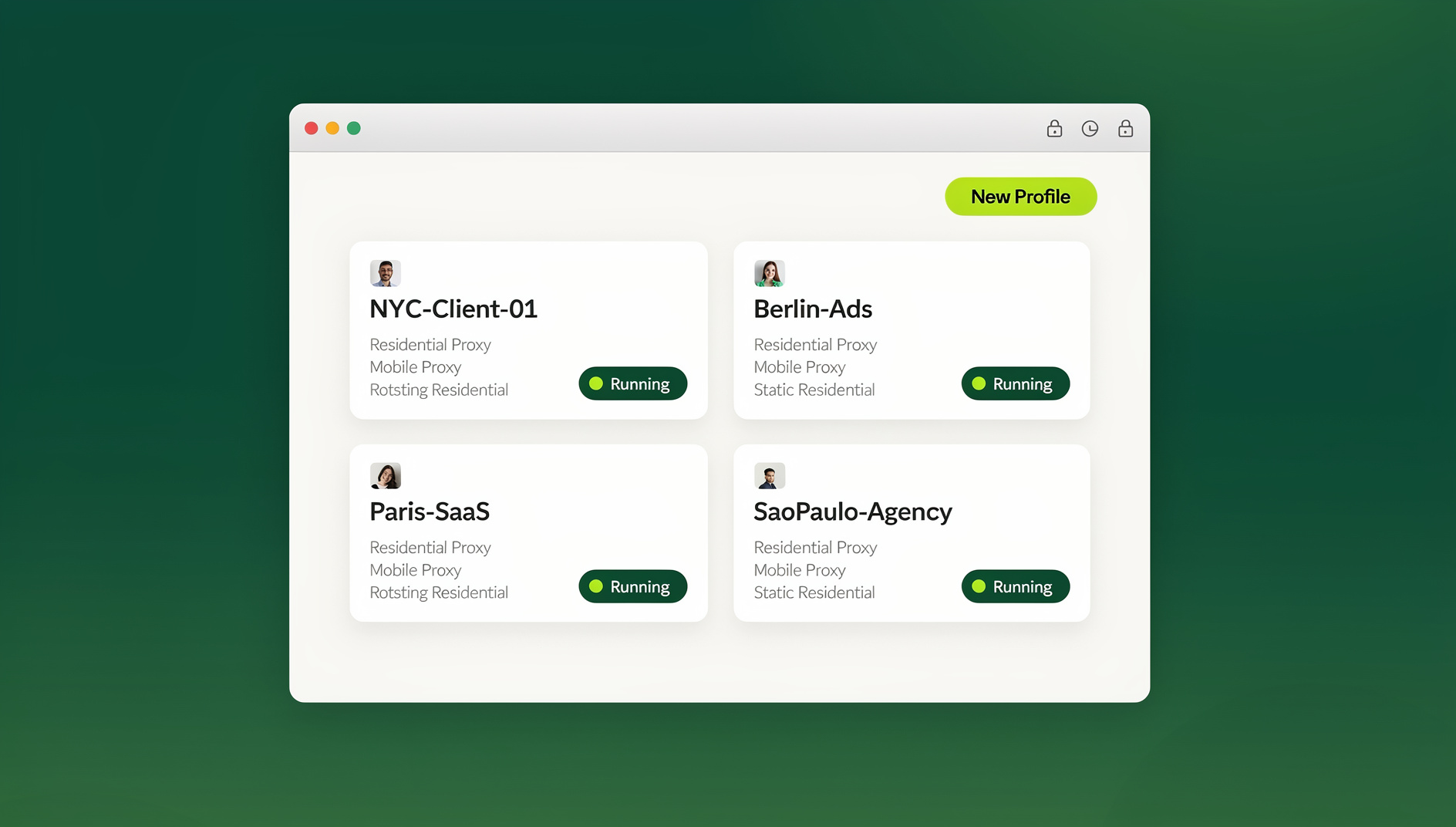
The pattern is consistent across agencies of every size. A founder starts solo, wins 4-5 clients, and handles everything personally — logging into each account from the same laptop, replying to comments between meetings, building reports by hand on Sunday nights. It works until client six or seven, when the founder is spending more hours on logistics than strategy. Hiring more people rarely fixes this on its own; without the underlying systems, more staff just means more people making the same manual mistakes across more accounts.
The Operating System Behind Agencies That Actually Scale
Documented SOPs Instead of Tribal Knowledge
An agency’s output quality should not depend on which team member happens to be handling a client that week. Standard operating procedures turn “how Sarah does it” into “how the agency does it” — a difference that matters enormously the moment Sarah goes on vacation or leaves the company.
- Client onboarding SOP: exact steps for requesting platform access, provisioning an isolated browser profile, auditing existing content, and drafting the first strategy document.
- Content production SOP: how briefs get written, how captions are localized per platform, how hashtag research is done, and what the final export checklist looks like before scheduling.
- Approval SOP: who signs off on content before it goes live, how revisions are tracked, and what the escalation path is if a client goes silent on approvals.
- Community management SOP: tone-of-voice guides per client, response-time targets, and a clear line for what gets escalated versus handled independently.
- Reporting SOP: the metrics every report must include, where the data comes from, and the exact template used so reports look consistent across every client.
A Three-Layer Tool Stack
Agencies that scale smoothly layer three distinct categories of software rather than trying to force one tool to do everything:
| Layer | Job It Does | Common Tools |
|---|---|---|
| Project management | Task assignment, deadlines, content approval trails | Asana, Monday, ClickUp, Notion |
| Scheduling and publishing | Queue content, auto-publish via platform APIs, batch analytics | Later, Buffer, Hootsuite, Sprout Social |
| Account isolation | Keep each client’s login environment separate for native, hands-on engagement | Send.win (isolated browser profiles per client) |
The first two layers get most of the attention in agency blog posts. The third is the one that determines whether the agency survives its first cross-client account suspension.
Role-Based Team Structure
Flat “everyone does everything” structures collapse somewhere between 10 and 20 clients. Scaled agencies move to defined roles:
- Account managers — own the client relationship, run monthly strategy reviews, and handle escalations. Typically responsible for 5-8 clients each.
- Content creators — specialists in design, video, and copy who work from briefs rather than raw client instructions. Usually cover 10-15 clients.
- Community managers — the people actually logged into accounts daily, replying to comments and DMs. Usually manage 8-12 accounts each.
- Media buyers — run paid campaigns across Meta, Google, TikTok, and LinkedIn Ads, frequently working across every client’s ad account at once.
Security Infrastructure: The Pillar Most Agencies Skip
This is the system agencies discover they need only after something has already gone wrong. When five community managers log into fifteen client Instagram accounts from the same shared office browser, every one of those accounts ends up connected by shared browser fingerprinting signals — cookies, device characteristics, IP history. One client’s policy strike can trigger a review that ripples across every other account that shares that browser environment, even clients who did nothing wrong.
Send.win addresses this at the profile level: every client gets a dedicated, persistent browser profile with its own isolated cookies, storage, and fingerprint surface, whether the team member is running it locally through the Sendwin Browser desktop app or spinning up a cloud browser built for agencies that needs no local install. Each client’s session behaves like a completely separate device to the platforms being managed.
Client Onboarding: A Repeatable Two-Week Sequence
Week 1: Access, Audit, Isolation
- Request platform access. Get admin or editor roles on every relevant profile, Page, and ad account before any work begins.
- Provision an isolated browser profile. Create a dedicated profile for the client, log into every account inside it, and complete any security checkpoints (2FA, device verification) once, so the session persists for the life of the engagement.
- Run a 90-day content audit. Identify which formats, themes, and posting times already perform best for this client, rather than starting from a blank slate.
- Run a competitor audit. Review 3-5 direct competitors’ recent social strategy for gaps and opportunities.
Week 2: Strategy, Calendar, and Reporting Setup
- Write the strategy document. Audience personas, brand voice guidelines, content pillars, and the KPIs the client actually cares about.
- Build the first 30 days of content. Populate the calendar across every platform the client is active on.
- Configure scheduling. Connect the client’s accounts inside the agency’s scheduling tool of choice.
- Set up automated reporting. Configure the dashboard and monthly report template before the first billing cycle closes, not after the client asks where it is.
What a Day Looks Like Inside a Scaled Agency
Morning Block (8:00-10:00 AM)
Community managers work through the unified inbox, triaging overnight DMs and comments across every assigned client. Anything that looks like a complaint or a brewing crisis gets flagged to the account manager immediately rather than handled ad hoc. Routine replies go out through each client’s isolated profile, so the response reads as native engagement rather than a batch reply from a shared tool.
Midday Block (10:00 AM-2:00 PM)
Content creators lock in the week’s remaining posts. Account managers work through the approval queue, chasing down any client sign-offs that are lagging. Media buyers review ad performance from the morning and make budget or creative adjustments before the afternoon traffic window.
Afternoon Block (2:00-4:00 PM)
This is the proactive engagement window — commenting on relevant industry posts, engaging with each client’s audience in Stories and Reels, participating in the right Groups. Content creators simultaneously begin production for the following week so nothing is being built the night before it’s due.
Delegating Client Access Without Credential Chaos
Password sharing is the single biggest operational liability at scale. Every time a freelancer is brought on for a seasonal spike, or a community manager gets reassigned to a different client roster, the agency either rotates passwords across every affected account or accepts the risk of an ex-team-member retaining access indefinitely. Neither option scales past a handful of clients.
The alternative is sharing access without sharing credentials:
- The agency owner or account manager authenticates each client’s accounts once, inside that client’s dedicated Send.win profile.
- A live session link is shared with the assigned community manager or media buyer — no password ever changes hands.
- The team member works natively inside the client’s account: replying to comments and DMs, managing ad campaigns, publishing content — with full functionality and none of the visible credentials.
- When the assignment ends, access is revoked in seconds. There’s no password to rotate and no lingering risk that a departed contractor still has the login.
For agencies running distributed or remote teams, this also solves the practical problem of one-click account switching — a team member covering multiple clients in one shift can move between isolated profiles instantly instead of logging out and back in for every account change.
Automating Client Reporting at Scale
Clients renew when they can see results clearly, and manual reporting becomes physically impossible somewhere past 15-20 clients. The fix is a reporting pipeline, not a bigger spreadsheet:
- Data source: pull from the scheduling tool’s API or directly from platform-native APIs (Meta Graph API, X API v2) rather than manual exports.
- Dashboard layer: Google Looker Studio or Databox for always-on, real-time client dashboards.
- Monthly deliverable: an automated, white-labeled PDF generated on a schedule rather than assembled by hand each month.
- Core metrics: follower growth rate, engagement rate, reach, impressions, click-through rate, and whatever conversion events matter to that specific client’s goals.
Crisis Management: The 15-Minute Response Protocol
Crises are a certainty at scale, not a possibility — a customer’s viral complaint, a scheduled post that goes out with the wrong caption, an ad account restricted mid-campaign. What separates agencies that survive a crisis from those that lose the client is response speed, and speed requires a protocol that doesn’t depend on who happens to be online.
- Detect: social listening tools (Mention, Brandwatch) surface the issue within minutes of it starting to spread.
- Assess: score the severity 1-5 — is this a manageable complaint or a genuine reputational threat?
- Respond: for severity 3 and above, the account manager takes direct control, logs straight into the client’s isolated profile, and has a response live within 15 minutes.
- Escalate: for severity 5 situations — legal threats, data breaches, viral negative press — loop in the client’s PR and legal contacts immediately, before publishing anything further.
Matching Your Stack to Your Agency’s Stage
| Agency Stage | Client Count | Priority System to Fix First |
|---|---|---|
| Solo founder | 1-5 clients | Written SOPs, even informal ones — stop relying on memory |
| Small team | 6-15 clients | Scheduling tool + isolated browser profiles per client (this is where account-linking risk first appears) |
| Growing agency | 16-40 clients | Role-based team structure + session sharing for delegation without credential exposure |
| Established agency | 40+ clients | Automated reporting pipelines + a documented crisis protocol |
🏆 Send.win Verdict
Agencies that manage multiple client social media accounts effectively treat account isolation as core infrastructure, not an afterthought. Send.win gives every client a dedicated, persistent browser profile — run locally through the Sendwin Browser desktop app or in a cloud browser session with no install required — so one client’s policy strike can never cascade into another’s account. Session sharing lets you delegate real work to community managers and freelancers without ever handing over a password, and access can be revoked instantly the moment an assignment ends.
Try Send.win today — plans start at Pro at $19/month or $83.88/year, or Team at $49/month or $251.88/year for larger rosters. The first card purchase is covered by a 7-day money-back guarantee, and you can preview the cloud browser free at the demo.
Frequently Asked Questions
How many client accounts can one team member realistically manage?
With proper systems in place: account managers typically handle 5-8 clients, content creators 10-15, and community managers 8-12. Without documented SOPs and isolated account access, those numbers drop by roughly half because far more time goes into logistics and error-correction.
What’s the single biggest mistake agencies make when scaling client accounts?
Running every client’s accounts from one shared browser session. It links otherwise unrelated client accounts through shared cookies and device fingerprints, so a policy violation on one account can trigger reviews or restrictions across every account that shares that browser environment.
How do agencies stop team members from posting to the wrong client’s account?
Mandatory approval workflows inside the scheduling tool, dedicated isolated browser profiles per client for any native (non-scheduled) work, and a simple “confirm client name before posting” step built into the community management SOP.
Does Send.win require installing a browser extension?
No — Send.win doesn’t offer a browser extension. It runs as the Sendwin Browser, a native desktop app for Windows, macOS, and Linux, or as a cloud browser session that runs entirely in the cloud with no local install at all. Agencies typically use the desktop app for daily community management and cloud sessions for quick access from a device that isn’t set up with the app.
Does Send.win offer an Automation API?
No. Send.win has no automation interface — no API, SDK, headless mode or Selenium/Puppeteer/Playwright support on any plan. Instead, each profile keeps its own cookies, storage and consistent browser fingerprint, so client accounts stay separate and organised. Pro is $19/month or $83.88/year, and Team is $49/month or $251.88/year for larger agencies.
How should a growing agency handle client reporting?
Automate it as early as possible. Pull data directly from platform APIs or your scheduling tool’s API into a live dashboard (Looker Studio or Databox), and generate the monthly client-facing PDF on a schedule rather than assembling it manually — manual reporting becomes unmanageable well before an agency reaches 20 clients.
What should an agency’s crisis response protocol actually look like?
A four-step loop: detect the issue via social listening tools within minutes, assess its severity on a 1-5 scale, have the account manager respond directly within 15 minutes for anything scored 3 or higher, and escalate immediately to legal or PR contacts for severity-5 situations like data breaches or viral negative press.
Can freelancers be onboarded without ever seeing a client’s password?
Yes. With session sharing, the agency owner authenticates the client’s accounts once inside an isolated profile, then shares a live session link with the freelancer. The freelancer works natively inside the account without ever seeing the underlying credentials, and access can be revoked the moment the contract ends.